For example, lets rename every instance of Type "Game" to "PC Game". We could go
through the entire list, and manually rename each individual Game Type to our desired
one. This is long winded and there could potentially be a lot of entries, can become
very boring and time consuming. We want to set up the List Maintenance Window like
this:
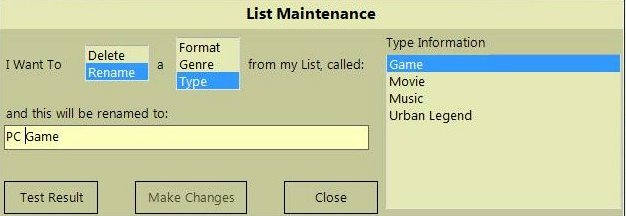
So the above would read as: "I want to Rename a Type from my list called Game and
it will be renamed to PC Game". Vanilla will auto populate the list according
to what you want to change. Press the "Test Results" Window, and with this example,
the preview list changed all of the "Games" into "PC Games":
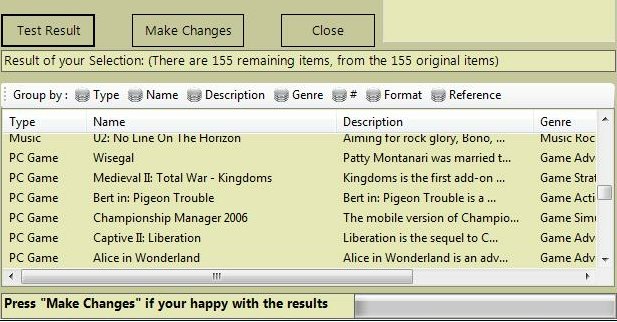
If your are happy with the result, press the "Make Changes" Button, and the list
will then permanently be changed. Then you can apply more changes if you desire
or just close the window.
For example, lets Delete everything what is on CD Format from our list. We could
go through each entry in our list and manually delete each one, but that would be
slow and annoying. Let's Use List Maintenance to do our dirty work for us. Create
the following query on List Maintenance:
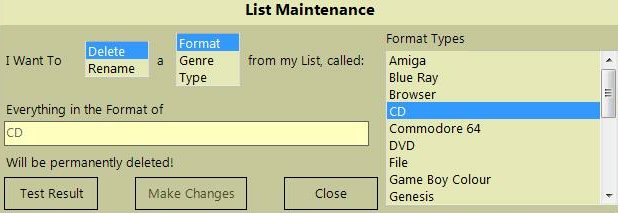
Which can be read as "I want to Delete a Format on
my list called CD. Everything in the Format CD will be permanently deleted!".
Once we press the "Test Result" Button, the preview list looks like this:
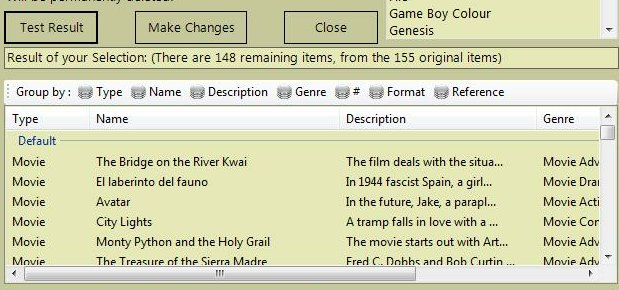
If you notice on the screenshot, there is a bit which says
"Result of your selection: (There are 148 remaining items, from the original 155
items)" This indicates that our operation has deleted eight items. If
we are sure this is what we want to do, We just press the "Make Changes" button.
The original list will be modified. This affects the list permanently.